


Qwen 2
Fast, versatile image generation for prompt-led creative work.
Upload an image. Extract 100+ details that you can tweak with sliders, color pickers, dropdowns and generate your photorealistic image.
Upload, paste, or drag a JPG/PNG here.
No image? Try one of these images
Upload one image. Image Prompt Maker reads every detail, hands you the controls, and turns a single input into a consistent system you can keep editing.
→ One reference, a consistent set
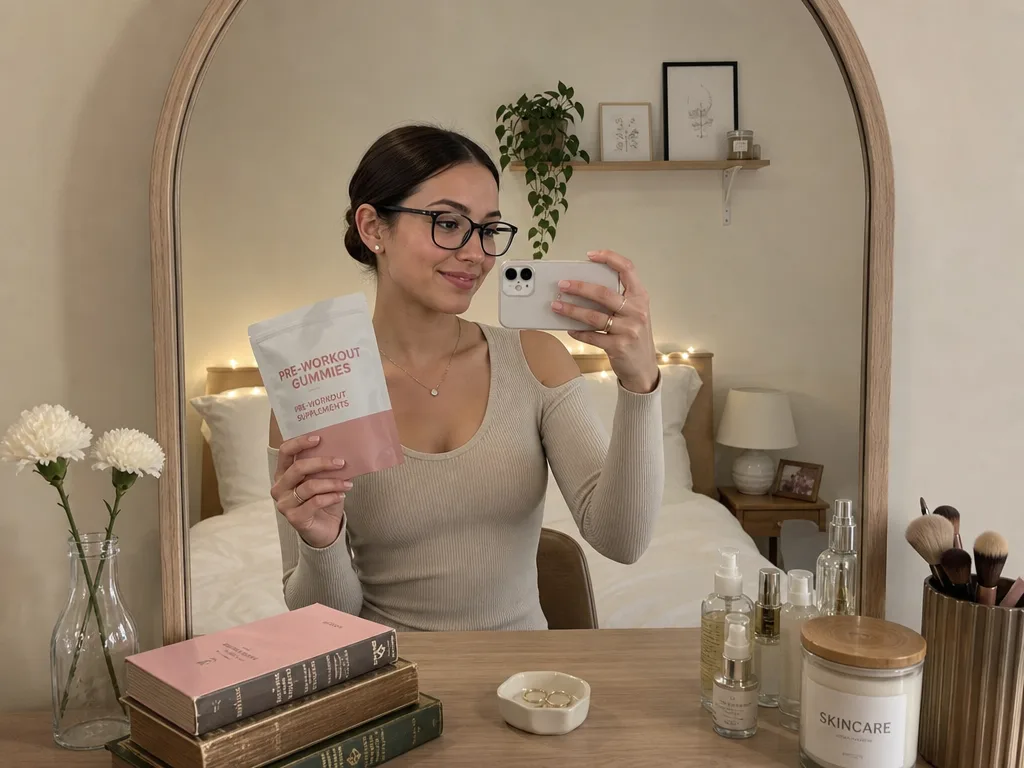
Swapped the held object — her pose, lighting and the whole scene stay intact.
Quick fix
Held object
Fast, versatile image generation for prompt-led creative work.
Efficient open image generation with strong detail and text rendering.
Lightweight production generation for sharp, precise color outputs.
Reference-guided image generation for controlled visual results.
Premium quality generation for polished, production-ready visuals.
Fast, high-quality generation with strong prompt following.
Lightweight generation for quick creative exploration.
Photorealistic generation with best-in-class text rendering.
High-fidelity image generation with strong text and layout control.
Fast, versatile image generation for prompt-led creative work.
Efficient open image generation with strong detail and text rendering.
Lightweight production generation for sharp, precise color outputs.
Reference-guided image generation for controlled visual results.
Premium quality generation for polished, production-ready visuals.
Fast, high-quality generation with strong prompt following.
Lightweight generation for quick creative exploration.
Photorealistic generation with best-in-class text rendering.
“I used to spend 20 minutes on a prompt. Now I just move a slider. Really glad I made the move to this app. It is also much more afforable.”
“Image Prompt Maker is insane. I am literally on my phone and I uploaded from Pinterest and the app completely reverse engineered it. I tweaked it a little to my liking and made new images for my brand. I have not seen anyone doing this.”
“gg man! Trying to get more people to join Image Prompt Maker, and it never fails to amaze!”
“For my beauty brand, because it is Islamic, I have difficulties finding models, but it is so tiring to write good prompts. Though Image Prompt Maker literallt eliminated the need to write prompts.”
“Writing prompts gives me so much anxiety. I have to consider so many things inside the prompt, but Image Prompt Maker eliminated the need to be a prompt engineer.”
“This tool is running my company, not even kidding. Hopefully we can expect regular updates”
Real feedback from the first creators on the platform.

Just upload a reference image. Image Prompt Maker will scan your image and extract its metrics such as facial features, body features, lighting conditions, props, environment, fabric textures, etc.
Use sliders and dropdowns to make exactly what you want - age, skin tone, gaze, posture, and more. No prompt writing. Just pick the values and generate.
Try DemoWant to use a different AI model not listed by us? No problem, Image Prompt Maker also gives you correctly formatted JSON code which you can simply paste into your favourite AI model. Even when you run out of credits, you can still get JSON outputs for free.
const persona = {
"occupation": "Fashion Model",
"styling": {
"topOutfit": "Cropped zip-up hoodie",
},
"technicalStyle": {
"lightingStyle": "Soft",
"lightingTemp": "Neutral",
"lightingIntensity": 50,
},
};
// Executing Generation Protocol...
Fine-tune every tiny detail of your AI image live with powerful annotation tools. Not satisfied with the final look? Just tap Edit and adjust it exactly the way you want.


Flip a control and watch the same shot re-render around it. These are three of the hundred-plus controls waiting in the studio.
+ 96 more unlocked in the studio →
{ "gender": "Female", "gaze": "Camera", "top_color": "blue" }

Image Prompt Maker is an AI image prompt generator that replaces manual prompt writing with over 100 visual controls. Instead of typing long descriptions, you select parameters like lighting, pose, wardrobe, skin tone, and mood through sliders and dropdowns. The app then compiles your choices into a structured, production-ready prompt and generates a photorealistic image — no prompt engineering experience required.
Not at all. Image Prompt Maker was built specifically so you never have to learn prompt syntax or memorize style keywords. You make creative decisions visually — the same way you would edit a photo in Canva or Photoshop — and the tool handles the technical prompt writing behind the scenes. It is the fastest way to go from an idea to a polished AI-generated image.
Yes. Upload any reference image and Image Prompt Maker will scan it with AI to extract detailed information including facial features, body composition, outfit details, lighting conditions, environment cues, fabric textures, and overall creative direction. The extracted data is mapped to editable controls, so you can use it as-is or fine-tune individual parameters before generating.
You have granular control over identity, estimated age, skin tone, gaze direction, posture, wardrobe (top, bottom, footwear, accessories), scene and environment, camera angle, lens feel, lighting style, lighting temperature, lighting intensity, mood, and creative style. Every control is designed to give you precision over the final image rather than leaving results up to chance.
Image Prompt Maker currently supports nine AI image generation models: Nano Banana Pro, Nano Banana 2, Nano Banana, GPT Image 2, Qwen 2 Pro, Qwen 2, Z-Image, Flux 2 Pro, and Kling O1. Each model has different strengths and credit costs, so you can choose based on your quality and budget needs. You can also switch models freely between generations — one prompt works across every model.
Yes. GPT Image 2 — OpenAI’s latest image generation model — is fully integrated into Image Prompt Maker on every paid plan. You can pick from three quality tiers to match your budget: Low for fast, low-cost drafts (5 credits), Medium for balanced quality and cost (30 credits), and High for top fidelity and the most accurate text rendering (110 credits). All three tiers also support 4K output, making GPT Image 2 a strong choice for designs that combine photorealism with readable text.
Yes. Image Prompt Maker includes a built-in AI image editor. You can draw a mask over any area of a generated image, describe the change you want in plain language, and the AI will re-render just that section. This lets you swap products, adjust clothing, change backgrounds, or fix small details without regenerating the entire image from scratch.
Absolutely. Every prompt you build can be exported as formatted text or as structured JSON data. This makes it easy to copy your creative direction into Midjourney, DALL-E, Stable Diffusion, or any other AI image generator. JSON export is free on paid plans, so you can keep using Image Prompt Maker as your prompt-building workflow even if you generate images elsewhere.
Image Prompt Maker offers a free trial with 150 credits — enough to generate your first image, try an edit, and explore the full interface. Paid plans start at $9 per month for 750 credits and scale up to $99 per month for 25,000 credits. Every paid plan includes access to all nine AI models, and you can upgrade or downgrade anytime without losing your work.
Yes. If you run out of monthly credits mid-project, you can top up with one-time credit packs instead of moving to a higher plan. Packs range from 500 credits for $5 up to 10,000 credits for $60, with the price per credit dropping as the pack gets bigger. Top-up credits are available on every paid plan, so you only pay for the extra AI image generation capacity you actually need.
Rollover credits are unused monthly credits that carry into your next billing period instead of disappearing right away, up to the rollover limit included with your plan. Rollover only applies when you stay on the same subscription. If you upgrade or downgrade, rollover will not be activated for that subscription change.
Batch generation lets you create multiple image variations from a single prompt in one run. Instead of generating images one at a time, you can produce several variations simultaneously — and it costs roughly 50% fewer credits per image compared to individual generation. This feature is available for Nano Banana Pro, Nano Banana 2, and Nano Banana models on Starter plans and above.
Yes. Image Prompt Maker supports native 4K image generation on Premium and Ultra plans. 4K output is available for Nano Banana Pro, Nano Banana 2, GPT Image 2, and Z-Image, giving you ultra-high-resolution AI images that are ready for print, e-commerce product pages, and large-format marketing. You can also enhance any existing image with the built-in AI upscaler, including Topaz-powered upscaling for maximum detail.
Images generated on the free trial include a watermark so you can test the full workflow before committing. Every paid plan — from Starter at $9 per month upward — removes watermarks completely, so all your AI-generated images are clean, full-quality files you can publish, sell, or share immediately.
Image Prompt Maker is a complete AI image workspace, not just a generator. Built-in tools include an AI background remover, an image upscaler with professional Topaz models for resolution up to print size, Change Angles to generate new camera perspectives from a single photo, and Create Variations to produce fresh takes on any image with the model of your choice. Combined with the mask-based AI editor, you can take an image from first concept to final asset without leaving the app.
Image Prompt Maker is built for anyone who needs consistent, high-quality AI images without the trial-and-error of manual prompting. That includes content creators, social media managers, e-commerce brands, fashion designers, marketing teams, product designers, and creative agencies. If you have ever spent 20 minutes tweaking a prompt only to get unpredictable results, this tool is for you.